The short version
- Every FireShield system runs the same software. What makes your system yours is a settings file the controller reads fresh every time it wakes up.
- That file holds your zone count, how long each zone runs, how each valve is wired, and how close a fire has to get before it starts.
- Change a setting and it takes effect immediately — no technician, no site visit, no software update pushed to the controller that protects your house.
- A valve wired backwards gets fixed by flipping a flag in the file. Nobody goes back up the ladder.
- If you're comparing FireShield with other systems, ask each of them: if I want my roof zone to run two minutes longer, who has to do what?
Here's a thing that happens on real installations, on good crews, on well-run jobs.
An installer runs wire to twelve valves across a roof and a yard. Eleven get landed correctly. On the twelfth — the one behind the chimney, at the end of a long afternoon — the two conductors go on backwards. Now that valve closes when it's told to open.
Nobody notices. It's a valve on a roof; it isn't doing anything visible on a Tuesday in June. It gets found four months later during a test run, or worse, it doesn't.
What happens next is the whole subject of this article, because the answer is completely different depending on how the system was built — and it's a question you can ask a salesperson before you sign anything.
Part 01: Two ways to build the same controller
Broadly, there are two ways to decide how a controller behaves.
The first is to put the behavior in the software. Twelve valves, four minutes per zone, this sequence, this pulse length — all of it written into the program that runs on the chip. It works. It's also rigid: if anything about the installation is different or wrong, the program has to change. And changing the program on a device already bolted to somebody's house means writing new software, testing it, and pushing it out to a thing whose entire job is to work correctly on one unpredictable day.
The second way is to put the behavior in a settings file and have the software read it fresh every time. The software never changes. The file does.
FireShield is built the second way. It's the first claim in FireShield's patent application, which is a reasonable signal of how central it is: the controller reads a configuration file at runtime and works out from that file how many valves there are, how they're grouped into zones, and what order to run them in — all of it "independent of any modification of the executable firmware."
That's dense language for something simple. Your system's personality lives in a text file, not in its software.
Every FireShield controller runs identical software. Your house is a settings file.
Part 02: What's actually in the file
This is where it gets concrete, and where the difference stops being philosophical.
For each individual valve, the FireShield settings file holds six separate numbers and flags:
How long that zone runs. Measured in minutes, and different from zone to zone. Your roof might want four minutes; the brush line along the back fence might want seven.
How long to push the valve. Different number entirely, measured in seconds. A motorized valve travels while power is applied and stops when it's cut. A valve on a high-pressure line can need 25 to 30 seconds to travel all the way open. The same style of valve on a low-pressure line might need only 1 to 10. Get it wrong short and the valve never fully opens. Get it wrong long and you're grinding a valve that's already seated.
What kind of valve it is. Some valves travel and stay put. Some only stay open while they're being powered. FireShield drives each one correctly because the file says which kind it is — so an installer can mix valve types on one system without anything being special-cased.
Whether the wiring is backwards. This is the flag from the top of the article. Set it, and FireShield inverts the signal for that one valve. The valve behind the chimney now works correctly. Nobody climbs anything.
Whether the valve is on at all. More on this in a moment.
Whether it's normally open or normally closed. Two different plumbing conventions, both used in the field. FireShield flips its own logic to match, so either can be used at any zone without rewiring.
Six settings, per valve, across up to 36 valves on a single FireShield controller. None of it requires touching the software.
Part 03: The part you control yourself
Everything above is installer territory. Here's the part that's yours.
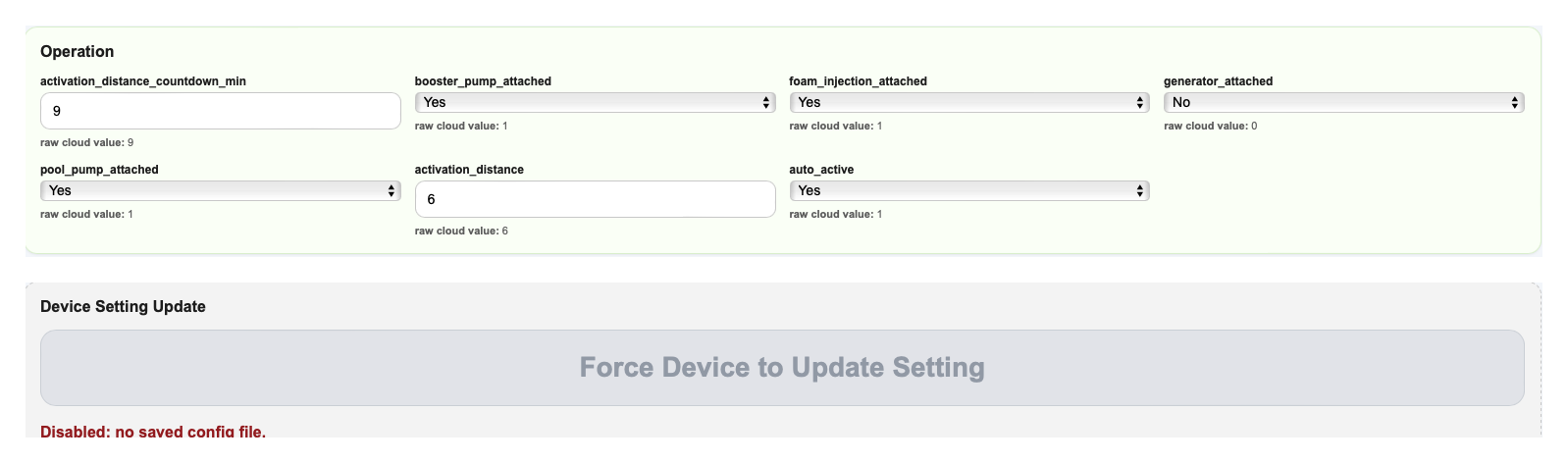
Some settings you change from the FireShield app, whenever you want, and they take effect immediately. The patent language is specific about this — a user changes an activation setting "from the application, from the cloud backend, or at the controller," and FireShield applies the new value right away, with no software change and no involvement from an installer, a technician, or the manufacturer.
In practice that means:
How close a fire has to get before your system starts. You set the distance. You change it in October and change it back in February if you want.
How long it waits before it starts. FireShield can be set to arm and count down rather than fire immediately, so you get a window to cancel if you're standing in the driveway watching it be a false alarm.
Which zones run. You can switch zones off — by setting, or in the middle of a run — and FireShield simply drops them from the sequence. There's a whole article on why you'd want to.
Named scenarios. Groups of zones you can select in one move: a roof scenario, a front scenario, an exposed-face scenario. Each one waters only the zones in its group.
One detail worth knowing: your settings file lives in two places, on the FireShield controller and in the FireShield cloud, and the two are kept synchronized. Change something in the app and it flows down to the controller. But if the internet is gone — which, during a wildfire, it eventually will be — the copy on the controller is the one in charge. Your system doesn't need permission from a server to know what it's supposed to do — which is the whole subject of the next article.
Part 04: Why this matters more than it sounds
There's a reason to care about all this that goes beyond convenience.
Any change to the software running on a life-safety device is a real event. It has to be written, tested, and shipped, and shipping it introduces the possibility of breaking something that worked. FireShield's patent puts the concern plainly: doing it this way "removes the delay and the risk of introduced defects that a firmware change to a life-safety device entails."
So the question isn't really "can I adjust my run time." The question is what class of event is an adjustment?
If adjusting your system means changing its software, then every small tweak carries a little bit of risk to the thing protecting your house, and you'll be quietly discouraged from asking. If adjusting your system means editing a file it reads on startup, the risk is close to zero and you can ask for whatever you want.
That's the difference. It's not a feature. It's the shape of the whole thing.
What to ask before you sign
Five questions, all answerable on the phone.
| Question | Why it matters |
|---|---|
| If a valve is wired backwards, what's the fix? | With FireShield it's a flag in a file. Ask what it is elsewhere — a return visit, or a software change? |
| Can I change my activation distance myself? | FireShield: yes, from the app, immediately. Ask who else has to be involved. |
| Can zone run times differ from each other? | Your roof and your brush line have different needs. FireShield sets run time per zone. |
| Does changing a setting require a software update? | With FireShield, no. This is the question that separates the two architectures. |
| Does it still know its settings with the internet down? | FireShield keeps the authoritative copy on the controller itself. |
Ask FireShield. Ask the competition. Ask anyone else on your list. You'll learn more from these five answers than from a brochure.
The valve behind the chimney is a small thing. But how a company answers for it tells you whether their system was designed to be lived with for fifteen years, or designed to be installed once and left alone.
FireShield was built for the first one.
Next in this series
- What Happens When the Cell Towers Go Down — How FireShield keeps working when the internet, the power, and the phone network are all gone.
- Skip the Zones You Don't Need — Watering only part of your property, and why that's the whole point.
- Why Most Wildfire Systems Break on the Hottest Day — The cooling fan and the computer, and why FireShield has neither.
- What Actually Has to Work When Nobody's Home — The whole system, start to finish, in plain English.
About FireShield — FireShield builds automated exterior wildfire defense systems for homes across Southern California. The controller described here is covered by FireShield's patent. See the wildfire defense system or talk to us.